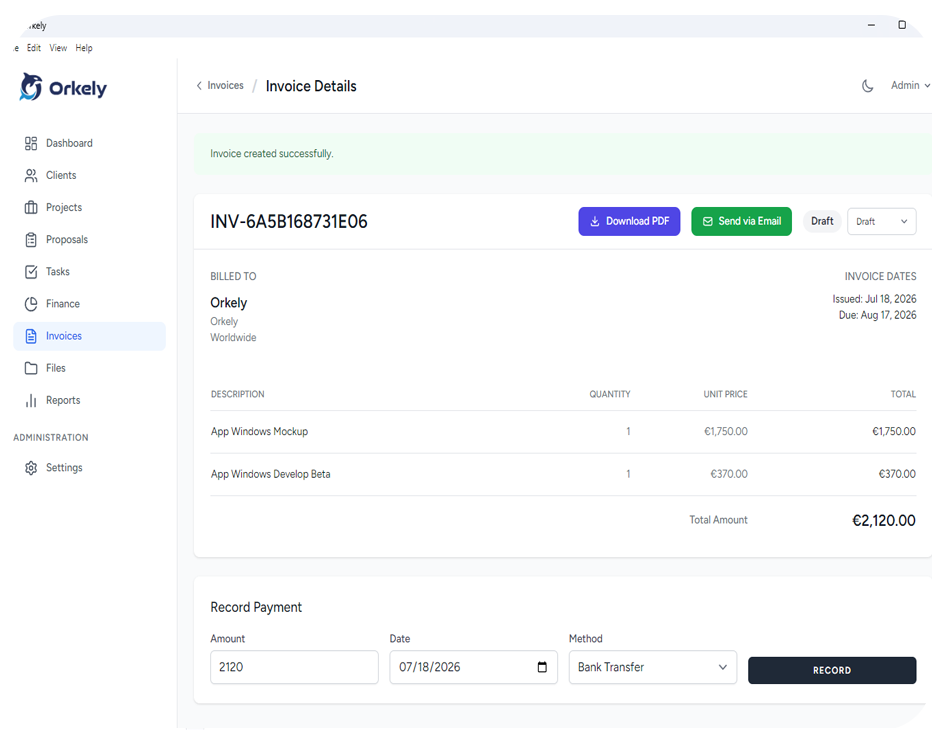
A pre invoice checklist helps you catch avoidable errors before a bill reaches the client. Check what you are charging, who should receive it and whether the payment instructions are complete. Reviewing the exported document matters as much as reviewing the entry form.
This is an operational checklist. Required invoice fields, taxes and document numbering depend on your location and business circumstances; confirm those requirements with an appropriate local source or adviser.
Check the agreement against the work
Open the agreed scope and compare it with the work ready to bill. Separate completed deliverables from unfinished tasks and approved additions. A task marked complete does not automatically mean it is due for billing under every agreement.
For milestone projects, identify the specific stage covered. For hourly work, review the relevant entries and descriptions. For a fixed fee, make sure the invoice reflects the agreed amount rather than treating internal time records as an automatic extra charge.
Record any approved change before including it. You should be able to explain a line without reconstructing several weeks of messages.
Review the billing identity
Confirm the recipient's business name, relevant address and billing email. A contact who approved the design may not be the person who processes payment.
Ask about required purchase order numbers, project references or submission portals before sending. If a client has an internal purchasing process, using the wrong route can create an avoidable administrative delay.
Do not guess an identifier from a similar company name. Confirm unclear details directly with the client.
Make each line understandable
Use descriptions the recipient can recognise. “Menu design — approved two-page layout” gives more context than “services”. Keep quantities, rates and the billed period consistent with the agreement.
Check discounts, deposits or previous billing against your actual records. The purpose is to avoid charging the same work twice or showing a balance that does not match the arrangement. Do not assume an invoicing tool automatically handles every type of adjustment.
Inspect the final PDF
Export and open the document before sending it. Review the business identity, client details, line descriptions, totals and payment instructions. Look for clipped text, an old logo or a bank reference copied from another job.
In Orkely's invoicing workflow, completed project tasks can be used to prepare invoice lines. The final review remains important: task names written for your own use may need clearer wording for the client.
Use this final check
- The work is ready to bill under the agreement.
- Approved additions are documented.
- The correct client and billing recipient are selected.
- Required references have been checked.
- Descriptions, quantities and totals are consistent.
- Payment instructions match the method you intend to offer.
- Previous payments and prior billing have been reviewed.
- The exported PDF opens and is readable.
- The sent copy and delivery date will be retained.
After sending
Record where and when you sent the invoice, plus any client acknowledgement. A saved PDF is not evidence that the recipient received it. If the delivery method fails, resolve that before relying on a reminder date.
Should I send an invoice immediately after every task?
Follow the agreed billing schedule. Completing a task and reaching a billable milestone are not always the same event.
Can software replace this check?
Software can reuse records, but it cannot know every instruction in your agreement. A brief manual review connects the invoice to the actual job.
Watch the invoice example on the Orkely help page before preparing your next bill.