Orkely 1.0.3 is now available for both Orkely Free and Orkely Pro via the Microsoft Store. Unlike the last two updates, this one is mostly new capability rather than bug fixes: files on tasks, payment methods that work outside the EU, trend charts, and proposal emails that carry their PDF again. Nothing about how your data is stored has changed.
Attach files to tasks
Files used to belong to projects. In 1.0.3 they can also belong to an individual task — the spec sheet for one stage of a job, the photo you took on site, the signed delivery note — and a task's attachments now appear in the project's Files list too, so the paperwork for a job stays together whether you filed it against the project or against the step.
Every attachment list also gained an Open file location action next to Open. Opening a file launches whichever program owns the extension, which is the wrong move when you are about to attach it to an email or copy it to a share; this takes you straight to the folder with the file selected instead.
Payment methods that work outside the EU
Bank details used to assume a specific European shape. Payment methods are now flexible: you label the rows yourself and fill in as many fields as you need, so a UK sort code and account number, a US routing number, or a payment link all fit the same form. You can also add a free-form row for anything that does not fit a template — a Stripe link, a Wise address, a note to pay in cash on collection.
Whatever you configure renders on the invoice and on the proposal PDF, so the client always sees the payment route you actually support.
Trend charts, on screen and in the PDF
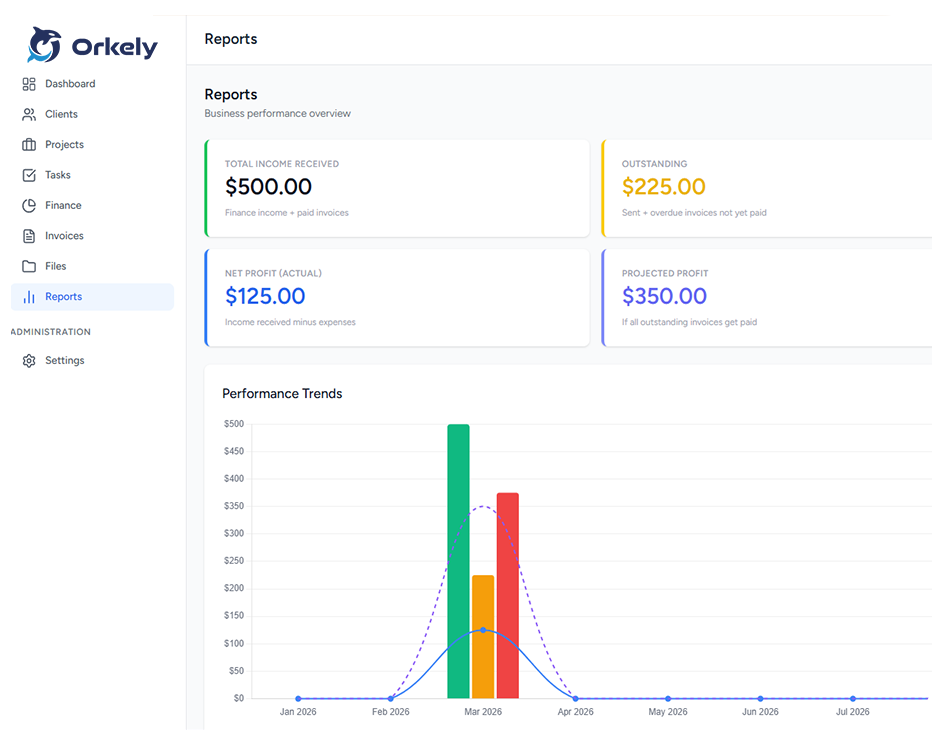
The dashboard now shows a yearly income and expense trend, so a good month and a bad one are visible next to each other rather than only as a single total. The same chart is drawn into the report PDFs, which means an exported report says the same thing as the screen it came from.
Proposals go out with their PDF again
A proposal email used to render the whole proposal inline in the body and attach nothing, while invoices attached theirs — an inconsistency with nothing on screen explaining it. Proposals once again leave with their PDF attached, generated from the same layout as the print view, so the attachment and the printed page cannot disagree.
If mail is not configured at all, the fallback is now honest about it: it writes the PDF into your Downloads folder, tells you exactly where it went, and gives you a message you can send. It also reports the right thing when a send fails instead of claiming success.
In Orkely Free: you can now see what Pro looks like
Free previously blocked the Proposals and Reports sections outright. In 1.0.3 those pages open instead, and show you the real screen behind a blurred overlay with a single upgrade prompt. Nothing is unlocked and nothing is hidden behind a paywall you cannot inspect — you can look at the actual proposal builder and the actual reports before deciding whether the one-time upgrade is worth it to you.
Smaller things worth mentioning
Recent Income on the finance screen gained a View all link through to the full income list. And a genuine bug is fixed in the proposal editor: clicking Bold, a heading, or a list button moved focus out of the text area, so whatever you typed next was silently discarded. If you ever lost a sentence that way, that was real, and it no longer happens.
Getting the update
Both editions update the same way — through the Microsoft Store. The update reaches you automatically, there is nothing to reinstall or reconfigure, and your local database is untouched. You can check your current version at any time from inside the app.