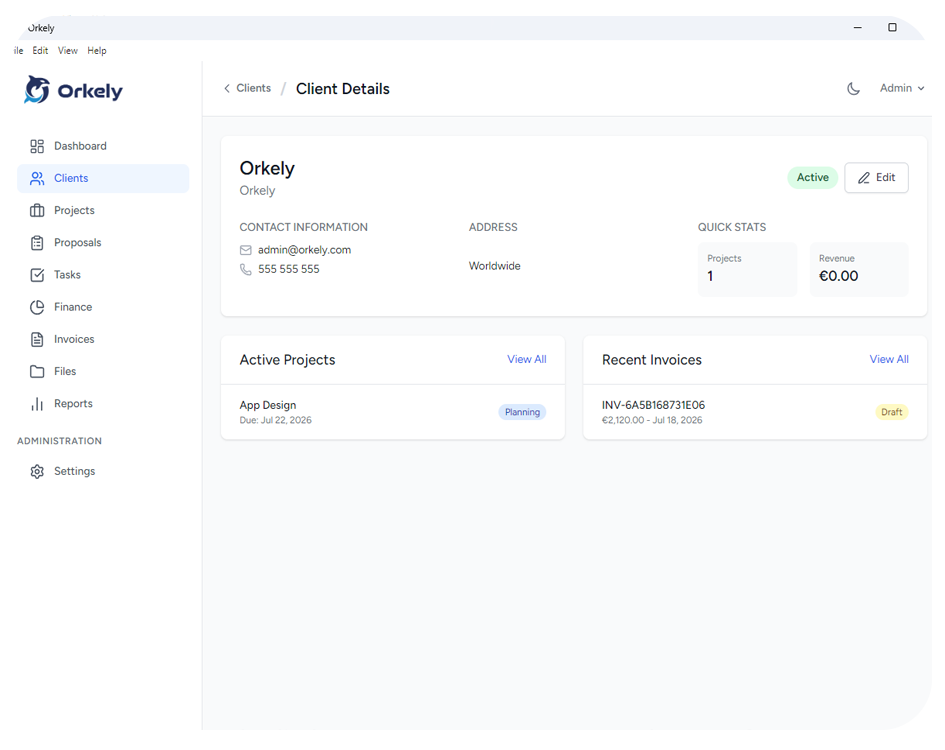
A CRM for one person should help you understand a client relationship quickly: who the client is, what you have agreed, what work is active and what needs to happen next. Start there before comparing sales dashboards or complex automation.
Freelancers often need a client workspace more than a large sales operation. The right choice depends on whether you mainly pursue leads, deliver projects or manage ongoing relationships.
Identify the job you need the CRM to do
Write down the questions you currently struggle to answer. Perhaps you forget who approved a quote, cannot find the previous invoice or lose the next action after a call.
These problems point to different capabilities. A pipeline helps organise prospective work. Linked projects help with delivery history. Notes and tasks help preserve decisions. Do not assume every application marketed as a CRM includes all three.
Keep essential requirements separate from features you might use later. A tool should work for your current business before you build a larger process around it.
Test one relationship from beginning to end
Use fictional information to create a contact, record an enquiry and add the next action. Continue through an example project and an invoice if those are part of your work.
Then leave the workspace and return as if a week has passed. Can you tell what happened without reopening every note? Can you distinguish lasting client information from instructions for one specific job?
This test exposes practical friction that a feature checklist can miss.
Look for useful connections
A contact list becomes more valuable when it helps you find related work. Check whether the application links projects and documents clearly, and whether search returns the record you expect.
Orkely's client management connects client records with project and invoice history. That is a delivery-oriented use case; do not infer an automated lead-scoring system, sales outreach engine or client portal from it.
Keep separate tools where they serve a genuinely different purpose. For example, a mailing platform may remain the right place for consent-based marketing campaigns.
Match access to your working habits
Do you need a phone interface, shared access or one local computer? Verify the supported arrangement instead of planning around a feature that does not exist.
Orkely is a single-user Windows application, as explained in its FAQ. It is worth considering when that is the environment you want, rather than when several colleagues need a shared live workspace.
Check data handling before committing
Find out how to back up your records and what happens when you change computers or stop using the application. Confirm any export options you need rather than assuming they are available.
Create a small trial dataset before moving a large archive. Check names, duplicate contacts and the relationship between old projects and current work. A migration plan is more useful than importing everything immediately.
Do I need a dedicated sales pipeline?
Only if tracking prospects through sales stages is a central requirement. Start with the actions and records you actually need.
Should I choose the product with the most features?
Choose the one that meets your essential needs and remains understandable during daily use. Unused complexity still takes attention.
Use the Orkely tutorial videos as a preview, then repeat the same fictional-client test in any application you compare.